


Stock Signals & AI Forecasts
4.419.00 Reviews
App Specs
- Version
- 2.2.53
- Updated On
- License
- Free
- Downloads
- 50,000+
- Developer
- Loheden AI Solutions AB
- Categories
- Finance
- Platform
- Android
Screenshots
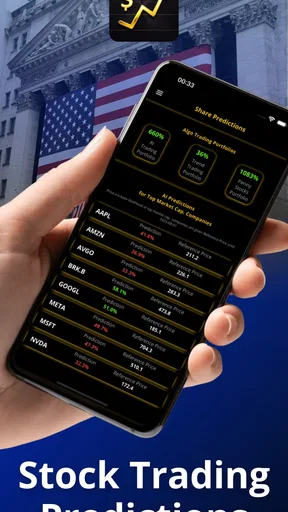
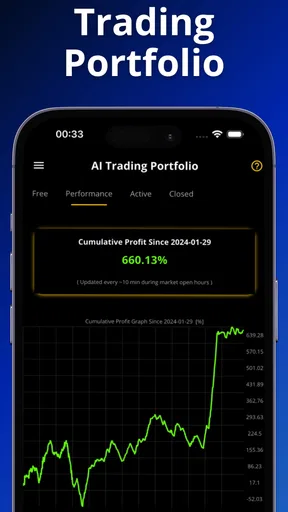
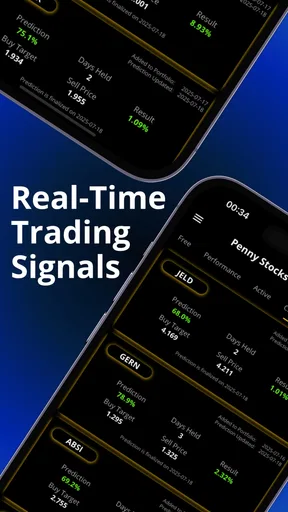
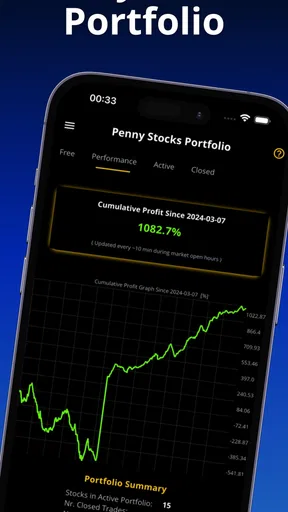
 Analysis by AppCompare
I approached Stock Signals & AI Forecasts as someone looking for a calmer way to study shares rather than as a replacement for a broker. It is a free finance app from Loheden AI Solutions AB that combines stock-trading signals, portfolio simulations, and technical-analysis tools. That combination makes it most interesting for the stage before a real order: forming an idea, checking it against a chart, and seeing how a hypothetical portfolio might behave.
My first impression was that the app is aimed at people who want more structure than a news feed but do not yet need a full professional terminal. The store short description, “Stock Signals,” is brief, but the practical experience is broader. The useful question is not whether a signal can predict the market perfectly; it cannot. The useful question is whether the app helps me turn an uncertain hunch into a testable plan without immediately risking money.
From a vague market idea to a testable portfolio
The starting condition is familiar. I may notice that a company has been moving strongly, hear someone discuss a possible turnaround, or simply want to learn how technical indicators behave. In a normal investing app, I might jump straight from that thought to a watchlist or an order screen. Here, the more sensible route is to pause and use the charting and signal tools as a research layer.
That distinction matters because a signal is an input, not a conclusion. I treat it as a prompt to investigate direction, timing, and risk. If I already have a clear investment thesis based on company finances, industry conditions, or a long holding period, technical output may only answer part of the question. If my goal is to understand short- and medium-term market behavior, however, the app gives me a more organized place to begin.
The app has reached over 50 thousand installs and holds a 4.4 average from around 756 ratings, which suggests that its basic idea has found an audience. I would still judge it by workflow rather than popularity. A finance tool can be widely used and remain unsuitable for someone who needs live execution, detailed fundamental research, or tax reporting.
Step one: define what I am actually testing
Before looking at a signal, I find it helpful to write down the question in plain language. Am I asking whether a trend is continuing? Am I comparing two possible entries? Am I trying to understand how a portfolio would have behaved if I had followed a rule? This small step prevents the common mistake of opening a chart with no decision in mind and then treating any attractive movement as confirmation.
For example, my starting condition might be: “I want to see whether a technical approach is consistent enough to study for several weeks.” That is very different from: “I want a guaranteed winner today.” The first question suits a simulator and a signals tool. The second is a warning sign that I am expecting too much from an app.
Worth Reading Before You Choose

EA SPORTS FC Mobile 26 Is a Bigger Football Game, but It Takes Time

Flipboard Shows What News Apps Must Do Beyond the Feed

Switching to Android Auto Means Rethinking Your Driving Routine

Google Calendar Makes a Crowded Week Easier to Manage

Ludo King Makes the Most of the Minutes Between Plans

Baby Panda World Brings Quick Play to Modern Phones, but Its Game Library Feels Busy
Step two: use the chart as evidence, not decoration
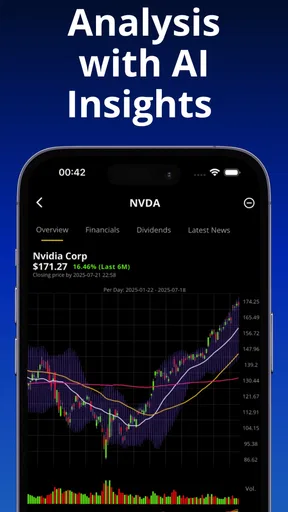
The technical-analysis tools are most useful when I read them together rather than treating one line as an automatic instruction. A rising signal may look encouraging, but I still want to consider the surrounding price movement and whether the broader pattern supports it. A weakening indication can be informative without meaning that a long-term holding should be abandoned.
This is one of the app’s practical strengths: it encourages a repeatable review instead of making the whole decision depend on a headline. I can begin with the signal, inspect the technical context, and then decide whether the idea deserves a simulation. That handoff from signal to chart is more valuable than simply collecting alerts, because it gives me a reason to challenge the first impression.
There is also a useful trade-off here. A compact signal-driven workflow is easier to start than a large research platform, but it cannot replace every form of analysis. Someone comparing debt levels, earnings quality, dividends, or company filings will still need another source. I would use this app to study market behavior and timing, not as my only research destination.
Step three: move the idea into a portfolio simulation
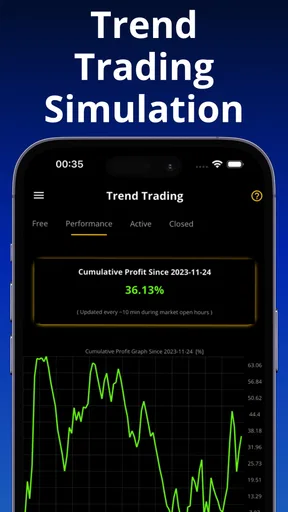
The portfolio simulation is where an abstract signal becomes a consequence. Instead of asking whether a chart looks promising, I can imagine what happens after choosing an entry, allocating a portion of a portfolio, and observing the result. Even without putting cash at risk, this forces me to confront concentration and timing.
My preferred workflow is deliberately modest. I would start with a small hypothetical allocation, record why the position was opened, and avoid changing the reason after the chart moves. If the simulated result is disappointing, that is not evidence that the app failed; it may show that my rule was vague, my timing was poor, or the signal did not fit the market conditions I had in mind.
A less obvious benefit of simulation is that it exposes emotional habits. In a real account, I might add to a losing position because I dislike admitting the original idea was wrong. In a simulated portfolio, I can observe that impulse with less pressure. The result is not a promise of future performance, but it can reveal whether my process is consistent enough to deserve further attention.
Step four: keep the handoff between tools disciplined
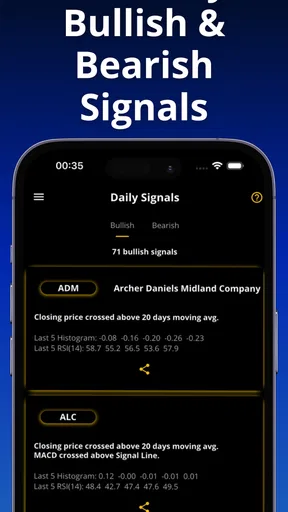
The handoff from a signal to a simulated position is the point where many users may overread the app. A signal can encourage a closer look, while the simulation can show a hypothetical outcome. Neither one automatically validates the other. I keep a simple separation in my thinking: the signal suggests a setup, the chart supplies context, and the simulated portfolio tests a rule.
That separation also helps when signals conflict. Rather than forcing a decision, I would mark the idea as unresolved and wait for a clearer relationship between the indicators and the price action. This is a concrete way to avoid turning uncertainty into an accidental trade. The app is more useful when I allow it to say “not enough evidence” through my own process, even if the interface presents information that feels actionable.
For a friend learning technical analysis, I would recommend using the simulator as a notebook with consequences. Choose one approach, keep the assumptions stable, and review several hypothetical positions together. Looking at one successful outcome can be misleading; looking at a group of decisions is more revealing. The app supports that learning mindset better than a simple quote screen because it connects analysis with portfolio behavior.
What the result tells me—and what it does not
The outcome I want is not a lucky simulated gain. I want to know whether my decision process is understandable. Can I explain why I followed a signal? Did the technical context support it? Did the hypothetical portfolio become too concentrated? Did I change the rules halfway through because the result made me uncomfortable?
When the answer is clear, the app has done something useful even if the simulated result is negative. It has converted a loose market opinion into a sequence I can inspect. That is a stronger result than simply receiving a bullish or bearish label, because it helps me identify which part of the process needs improvement.
The app is also suitable for an everyday scenario. Imagine I have a short evening window after work and want to review a company without opening a complex desktop platform. I can begin with the signal, inspect the technical picture, place the idea into a hypothetical portfolio, and note whether the result supports further study. I would then stop there rather than treating the session as a reason to place a real order immediately.
That last handoff—from simulation to a real brokerage account—should remain entirely deliberate. I would verify the company, the instrument, the current market situation, and my own risk limits elsewhere before investing. The app can help prepare a decision, but it is not the same thing as execution, custody, or personal financial advice.
Where the workflow becomes less comfortable
The biggest limitation is the danger of false confidence. The presence of AI forecasts can make an uncertain estimate feel more authoritative than it really is. I would be especially careful during fast-moving markets, when a forecast may be quickly overtaken by new information. A clean interface and a confident-looking indication do not remove volatility, gaps, or unexpected events.
There is also friction for users who want a complete investing environment in one place. If my priority is buying and selling directly, managing deposits, viewing tax documents, or researching company fundamentals in depth, I would choose a conventional brokerage or a broader market-research platform instead. This app makes more sense beside those services than in place of them.
The free entry point is welcome, but in-app purchases range from $14.99 to $79.99 per item. That makes it important to understand which parts of the experience I can use comfortably before paying for anything. I would not purchase an upgrade simply because a forecast sounds persuasive. The right test is whether a paid element improves a repeatable research routine that I already understand.
Another point of friction is the learning curve around technical language. A newcomer may recognize that a signal is positive or negative without understanding how it was formed or when it tends to be unreliable. I would spend time learning the meaning and limitations of each tool rather than collecting indicators. More information can make a decision worse when it is not connected to a clear rule.
The app is rated for Everyone, and it runs on Android from version 7.1 onward. That broad accessibility makes it easy to approach, but an age rating should not be confused with financial suitability. A younger or inexperienced user can open a finance app safely and still need guidance about risk, simulated performance, and the difference between research and investing.
Who will get the most from it
I think it is a good fit for a learner who wants to practice reading technical setups, for an investor who wants a separate idea-testing layer, and for someone who prefers a portfolio simulation before committing funds. It can also suit a busy user who wants a focused mobile workflow rather than a large desktop dashboard.
I would recommend it particularly to people who are willing to keep notes and review decisions over time. The app becomes more valuable when I use it to compare a consistent method against my instincts. If I only open it when I want confirmation for a trade I already intend to make, its signals are likely to become decoration for a decision made elsewhere.
I would skip it as a primary tool if I need direct order execution, professional-grade research, or a single place for every account-management task. I would also avoid relying on it if I am looking for certainty or guaranteed returns. A traditional broker is better for transactions, while a fundamental-analysis service is better for detailed company research. The choice depends on whether my starting condition is “I need to place an order” or “I need to test an idea.”
My practical routine after using it
My routine would begin with a written question, continue with a signal and technical review, and then move into a conservative simulation. I would keep the assumptions unchanged, examine more than one outcome, and record what would make me abandon the idea. Only after that would I consider checking the same opportunity through a broker and other research sources.
I would also set a stopping point. Endless chart checking can feel productive while adding no new evidence. Once the signal, technical context, and simulated action have been recorded, I would close the app and return later for a planned review. This protects the workflow from turning into impulsive monitoring.
The current version is 2.2.53, and the app was released on June 11, 2022. Those details are useful when checking compatibility and deciding whether the app fits an existing device, but they do not change my central assessment: the value comes from the discipline of the workflow, not from treating the version number or an AI forecast as a guarantee.
My verdict
Stock Signals & AI Forecasts is a focused finance companion for moving from market curiosity to a testable hypothetical portfolio. I like the handoff from signals to technical context and then to simulation, because it creates room to question an idea before real money is involved. Its best use is educational and preparatory: building a repeatable process, spotting emotional habits, and deciding whether a setup deserves more research.
I would recommend it to a careful learner or an investor who wants an additional mobile research layer. I would not present it as a broker, a complete fundamental-analysis platform, or a shortcut to reliable predictions. Used with those boundaries, the free app offers a practical way to slow down the jump from a market hunch to a financial decision. Used without them, the forecasts and signals could make uncertainty look simpler than it is.
Pros
- AI forecasts help identify potential market trends quickly.
- Customizable alerts keep users informed about relevant price movements.
- Supports multiple assets for broader portfolio monitoring.
- Clean interface makes complex market data easier to follow.
- Useful educational insights for users learning technical analysis.
Cons
- Forecasts can be inaccurate during sudden market volatility.
- Some advanced signals may require a paid subscription.
- Real-time features depend on a stable internet connection.
- Frequent alerts may encourage emotional or excessive trading.
- Market coverage and data availability can vary by region.
FAQs for Stock Signals & AI Forecasts
What is Stock Signals & AI Forecasts, and how does it work?
Stock Signals & AI Forecasts is a market-analysis app designed to help users research stocks using algorithmic signals, price forecasts, technical indicators, and related market data. After selecting a company or ticker, you can review the app’s estimated direction, charts, and supporting metrics. These forecasts are generated from historical and current data, so they should be treated as research tools rather than guaranteed predictions.
Can Stock Signals & AI Forecasts guarantee profitable trades?
No. The app cannot guarantee profits or accurately predict every market movement. Stock prices can change suddenly because of earnings reports, economic news, political events, interest rates, company announcements, and investor sentiment. Signals and AI-generated forecasts may be useful for identifying ideas, but they should be combined with your own research, risk management, and, when appropriate, advice from a qualified financial professional.
Is Stock Signals & AI Forecasts suitable for beginners?
The app can be useful for beginners because it presents market information, signals, and forecast data in a more accessible format than analyzing multiple financial sources manually. However, new investors should first learn basic concepts such as volatility, diversification, stop-loss orders, and position sizing. A simple interface does not remove the risks of investing, and users should avoid trading with money they cannot afford to lose.
What information or features can users expect inside the app?
Depending on the selected stock and available subscription level, users may find AI-based forecasts, buy or sell-style signals, technical analysis, price charts, watchlists, market summaries, and notifications. The exact tools can vary by app version, region, and plan. Before downloading or subscribing, review the current store listing carefully to confirm which features are included and whether advanced data requires payment.
Is Stock Signals & AI Forecasts free to download, and are there subscriptions?
The app may be available to download at no initial cost, but some signals, forecasts, alerts, or advanced research tools can be restricted to a paid subscription or in-app purchase. Pricing, trial periods, renewal terms, and cancellation procedures may differ between Android and iOS. Check the official store page and the in-app purchase screen before starting a trial, and confirm how automatic renewal is managed on your device.


